

Description
Download Dial-a-fix – Windows utility, error fix tool, Windows Update fix, Internet Explorer fix, system repair tool
Overview
Dial-a-fix is a utility tool developed for Windows users seeking to resolve common and complex system errors within the Microsoft operating system. Designed primarily for advanced users, the application provides a centralized solution for troubleshooting issues related to Windows Update, Internet Explorer, and other core system components. Its purpose is to streamline the error correction process by bundling multiple fixes into a single, accessible interface. This makes it particularly useful for users who frequently encounter recurring system glitches that disrupt productivity or prevent essential functions from operating correctly.
The app addresses real-world challenges such as failed updates, corrupted browser configurations, and system instability caused by outdated or broken system files. While the target audience leans toward experienced users, the tool’s straightforward interface attempts to lower the barrier to entry for those with intermediate technical knowledge. Its utility lies in reducing the time spent researching individual fixes online, offering immediate access to pre-tested patches. In the broader app ecosystem, Dial-a-fix fills a niche for lightweight, no-frills system repair tools that prioritize functionality over visual polish.
The developer did not provide additional technical details about the tool’s architecture or update frequency. However, its release date of April 20, 2007, suggests it has been in use for over 15 years, indicating a degree of reliability and user trust. Despite its age, the tool remains relevant for legacy Windows systems where modern repair utilities may not be compatible. The application continues to serve as a practical resource for users needing a direct fix for persistent system issues without relying on complex diagnostic tools.
Key Features & Functionality
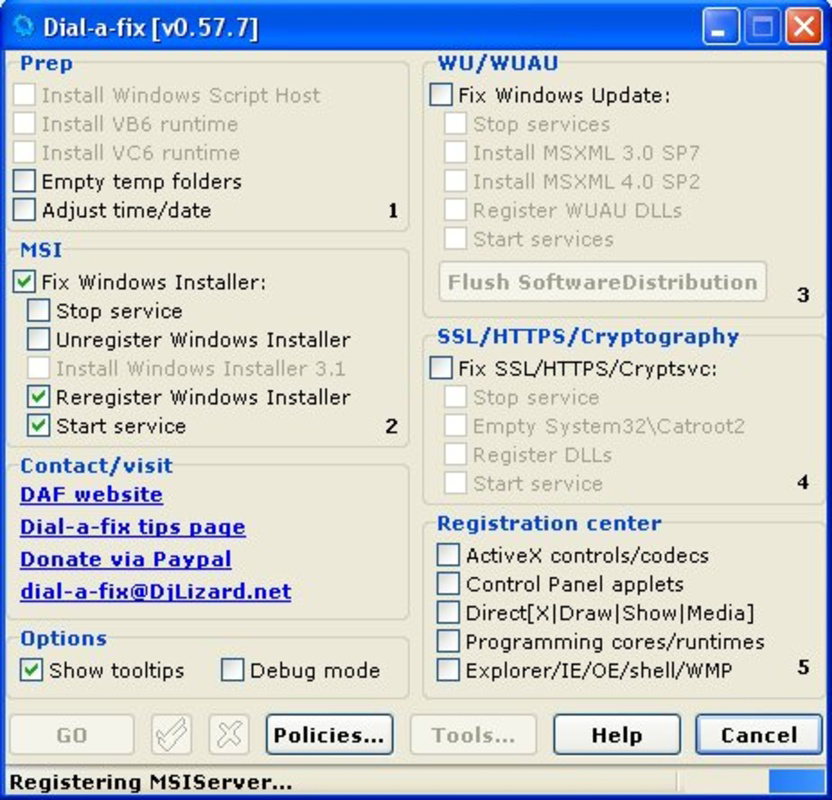
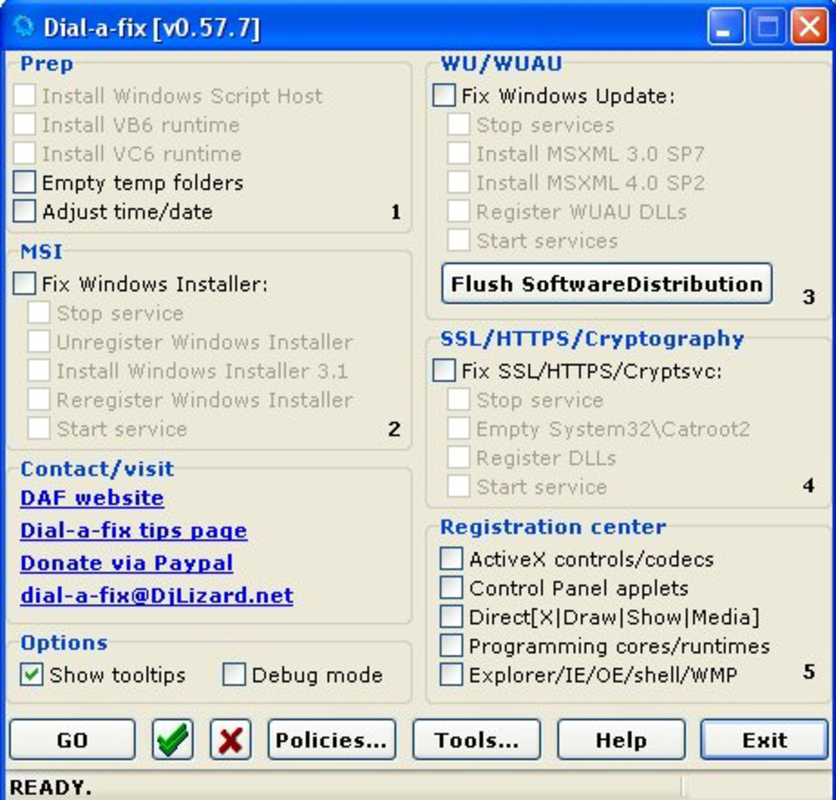
- User-Friendly Interface: Despite being aimed at advanced users, Dial-a-fix features a clean, straightforward layout that allows users to select and apply fixes with minimal effort. The interface avoids clutter, focusing on essential functions to prevent confusion during troubleshooting.
- Comprehensive Error Fixes: The tool is capable of addressing a wide range of Windows-specific issues, including problems with Windows Update failures, Internet Explorer crashes, and system configuration errors. It targets both minor anomalies and more severe system disruptions.
- Built-In Patches: Dial-a-fix includes a collection of pre-configured patches designed to resolve known bugs and vulnerabilities. These patches are intended to be applied automatically, reducing the need for manual registry edits or command-line operations.
- Immediate Problem Resolution: With a single click, users can initiate repairs for selected issues. This rapid response capability helps minimize downtime, particularly in work environments where system stability is critical.
- Targeted System Maintenance: The application focuses on core Windows components, ensuring that essential features like the update engine and browser functionality remain operational. It does not attempt to overhaul the entire system but instead provides precise, targeted fixes.
For example, a user experiencing a persistent Windows Update failure can select the relevant fix from the tool’s menu and apply it instantly. Similarly, someone dealing with Internet Explorer errors may use the tool to reset browser settings or repair corrupted files. These use cases highlight the app’s practicality in real-world scenarios where time and technical expertise are limited.
Interface, UX & Performance
Dial-a-fix presents a minimalistic interface with a focus on functionality over aesthetics. The layout is structured around a list of available fixes, each labeled clearly with its purpose. Navigation is linear and intuitive, allowing users to select an issue and initiate the repair process with a single click. The absence of complex menus or redundant options contributes to a streamlined user experience.
Although the developer did not list formal performance metrics, the application’s small file size of 1.2 MB suggests it is lightweight and optimized for low-resource environments. It is likely to run efficiently on older Windows systems, including those with limited RAM or processing power. The tool does not consume significant system resources during operation, which enhances its usability in performance-constrained scenarios.
Responsiveness is consistent with its design philosophy—immediate action upon selection. The application does not require lengthy loading times or background processes. Stability appears to be a core strength, given its long-standing presence in the Windows utility space. However, compatibility with newer Windows versions has not been confirmed, and users should exercise caution when deploying the tool on updated systems.
Platform Compatibility & Technical Requirements
Dial-a-fix is designed for the Windows operating system. The application is compatible with Windows platforms, though specific version requirements were not listed. The file size is 1.2 MB, making it suitable for systems with limited storage capacity. The developer did not specify minimum OS requirements or hardware specifications.
Given its release date of 2007, the tool was originally developed for older versions of Windows, such as Windows XP or Vista. While it may still function on modern systems, compatibility is not guaranteed. Users should verify whether the tool works with their current Windows version before installation. The developer did not disclose whether updates are still issued or if the tool is actively maintained.
Pros and Cons
Pros
- Lightweight and fast, with a minimal file size of 1.2 MB
- Offers immediate fixes for common Windows issues
- Includes built-in patches for known system errors
- Simple interface suitable for intermediate users
- Free to download and use
Cons
- Designed primarily for advanced users; may pose risks for beginners
- Compatibility with modern Windows versions is uncertain
- Developer did not provide update history or support information
- No official documentation or user guides were included
- Age of the software raises concerns about security and long-term reliability
FAQ
Is Dial-a-fix safe to use?
The tool has been in use since 2007 and is generally considered safe for users who understand its purpose. However, because it modifies system components, improper use could lead to instability. Always back up your system before applying fixes.
Can I install Dial-a-fix on Windows 10 or Windows 11?
While the application may run on newer Windows versions, compatibility is not officially confirmed. Users should test the tool in a safe environment before deployment on critical systems.
Is Dial-a-fix free to download?
Yes, Dial-a-fix is available at no cost. There are no in-app purchases or subscription fees.
Does Dial-a-fix require internet access?
The tool does not require an active internet connection to function once installed. However, some fixes may involve downloading additional components, depending on the system configuration.
How often is Dial-a-fix updated?
The developer did not provide information on update frequency. Given the tool’s release date in 2007, it is possible that updates are no longer issued.
Final Thoughts + CTA
Dial-a-fix remains a notable utility for users managing legacy Windows systems or seeking quick fixes for persistent errors. Its ability to resolve Windows Update and Internet Explorer issues with a single click makes it a valuable tool in specific scenarios. While its age and lack of modern support present risks, its lightweight design and free availability continue to offer practical benefits for experienced users.
Those who are comfortable with system-level changes and need a no-nonsense repair solution will find value in this tool. It is not recommended for casual users or those unfamiliar with Windows internals. For the right audience, Dial-a-fix delivers a reliable, straightforward method to restore system functionality without extensive troubleshooting.
Download Dial-a-fix now
Guides & Tutorials for Dial-a-fix
How to install Dial-a-fix
- Click the Preview / Download button above.
- Once redirected, accept the terms and click Install.
- Wait for the Dial-a-fix download to finish on your device.
How to use Dial-a-fix
This software is primarily used for its core features described above. Open the app after installation to explore its capabilities.
User Reviews for Dial-a-fix 0
No reviews found


